Intro to Automations (fka “Workflows”)
In Dailybot, an automation is an operation comprised of triggers and actions that help you automate something at work. Learn more about the concepts that you'll find when implementing one in the web app:
Contents
1️⃣ Triggers:
Triggers are events that tell Dailybot to do something. When an automation is "triggered," some event that you previously chose just happened, and DailyBot noticed. Essentially, all automations start with an event that triggers an expected action.
⏰ IF something happens (your event)
⚡ tell Dailybot to DO something else (expected action)
Dailybot comes with 15 built-in triggers to help you build automations. Let's see what these are:
User runs a shortcut/command
You can use one of the custom commands you've created to trigger an automation.
Scheduled Task is triggered
Use cron expressions to trigger a new automation in the time or frequency you desire.
User completes a check-in
Every time a check-in participant completes their report by chat or web, this event will be triggered.
User reports a blocker in a check-in
Every time a check-in participant completes their report by chat or web, AND their report contains a blocker, this event will be triggered.
Form received new response/record
Every time a user fills out one of your forms, this event will be triggered.
Form record is updated
Every time a user edits a response they previously gave you in one of your forms, this event will be triggered.
Form record is approved
Every time a user fills out one of your forms with approval flow, and one of the selected people approves their request, this event will be triggered.
Form record is denied
Every time a user fills out one of your forms with approval flow, and one of the selected people denies their request, this event will be triggered.
Another Automation has finished
You can nest your automations (!) and use the end of one automations to trigger another.
Activity logged in DailyBot
With the help of our native integrations, you can ask DailyBot to trigger an automation every time it captures new activity from one of these integrations. You can choose between:
Code push
Pull request created
Pull request merged
Task created
Task updated
Task status updated
Task item checked
Worklog created
Project released
Sprint closed
Custom activity via API
Event sent to Automation Trigger API
Use the Automation API trigger to send any JSON event to Dailybot to start a new automation.
Kudos given by any person
This event will trigger an automation any time someone gives kudos, regardless of the destination, message, or team value you choose.
User is added to this organization
Every time a new user is activated in your organization, this event will be triggered.
User is added to a team
Every time someone adds someone else to a team in your organization, this event will be triggered.
User is removed from a team
Every time someone removes someone else from a team in your organization, this event will be triggered.
2️⃣ Actions
Actions are operations that you can run after your initial trigger. When an automation is "triggered," Dailybot prepares the list of actions that you previously chose to execute it, in order, until the full process is completed. Essentially, all automations need an action to perform after a trigger.
⏰ Every time your chosen event is triggered
⚡ Dailybot performs a set of actions
Dailybot comes with 5 built-in actions to help you automate processes. Let's see what they are:
Send a chat message
This action sends a message to user DMs or channels using Dailybot in chat. These users can be handpicked in advance, or selected dynamically according to the context of the automation when someone triggers it.
Send an email message
This action sends an email to DailyBot users or external email addresses that you specify.
Trigger custom command
This action runs one of your custom commands and sends the output to specific channels or DMs of your choice.
Select random Form record
This action picks a random entry from one of your forms, so you can use it in the next action.
Insert Form record
This action creates a new entry in the form of your choice.
3️⃣ Target
Targets are the places and people that are part of your automation. When an automation is "triggered," you can choose the specific places where you want your action to happen, as well as the people that should be impacted by said action.
⚡ Dailybot performs an action within your automation
🎯 A specific place in your chat (or somewhere else) and some people are impacted
Dailybot comes with 6 different targets to help you target your actions:
Channels / spaces
Dailybot allows you to send actions to specific channels (both public and private). In private channels, Dailybot must be invited to these channels before they can be used in an automation.
People or teams
Eligible actions come with a dropdown where you can pre-select active Dailybot members as well as teams inside your Dailybot organization. For instance, if your action is "Send a chat message," these people or teams will receive your message every time the automation is triggered.
User involved in this flow
This target option is dynamic in regards to who triggers your automation. You can choose between: a) The automation owner or b) The user who caused your automation to be triggered.
Custom emails
This target option allows you to send emails to external (or not-email-identified) Dailybot users.
4️⃣ Variables
Variables are placeholders you can use in your messages to dynamically introduce a piece of information to your automation. They have the form {{variable_name}} and you can pull up the list of working variables by simply typing {{ in the message box of your automation action.
5️⃣ Commands are now part of Automations
DailyBot lets you create your own commands, and they get available via chatbot and help your team save time and fully automate workflows.
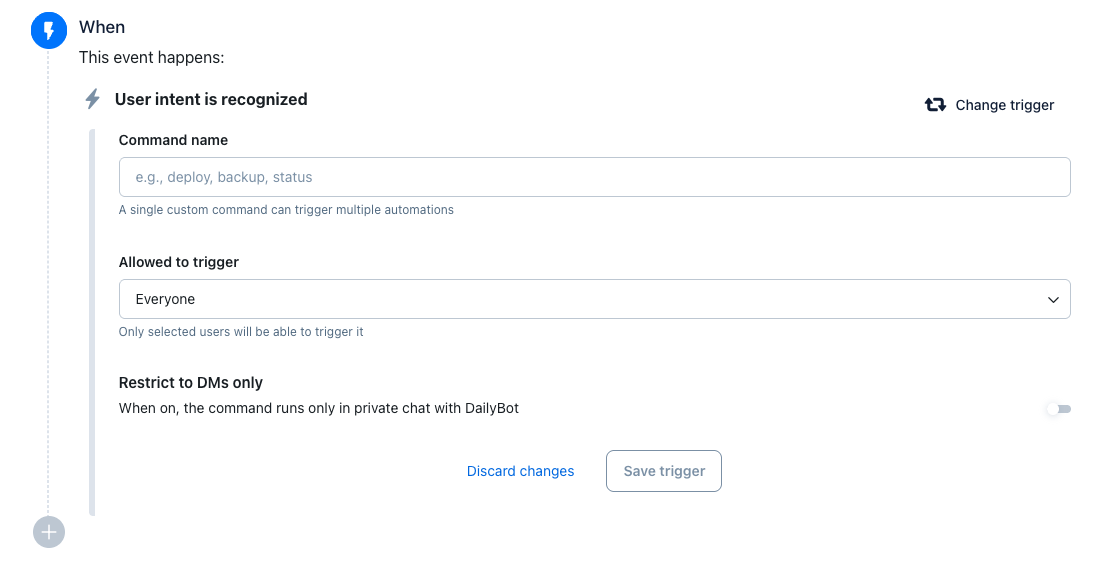
You can now also use the “User intent is recognized” trigger inside the Automation Builder. This trigger listens to what people say to DailyBot (previously known as a command), and based on that intent it starts multi-step workflows of your choosing. It's just like the previous standalone “commands” feature, but now with the full power to chain actions, conditions, and other DailyBot steps in a single flow.
This change is part of our ongoing effort to unify everything into one automation platform for team ops, so instead of separate features, you build and manage all your intent-based workflows from one place.